
Mobile access
Fastbet Thronebet Tanzania app: install it or use the mobile site
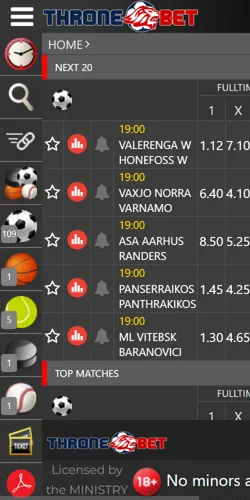
Your phone already carries the full Fastbet Thronebet Tanzania account. Install the Android app from the operator's own site, or stay in the mobile browser: the same bet slip, the same 500 TZS minimum deposit through M-Pesa, Tigo Pesa or Airtel Money, the same balance either way.
Current state
The app question, answered with dates

Review sites still say there is no app. Those reviews were written in 2022 and 2023, and they were right at the time. The operator header now carries a Download App link, checked on 19 August 2026, so following the old answer costs you a feature instead of saving you a download.
What the link gives you is an Android install file served from the operator's own domain. There is no separate account inside it: your phone number and password open the same balance, the same open bets and the same 1,000 TZS minimum withdrawal as the website.
- 2022: major review sites record no app of any kind.
- 2023: reviews still describe a browser-only service.
- 19 August 2026: a Download App link sits in the operator header.
Android install
Installing on Android the safe way
The only safe source is the operator's own website. Search results and messaging apps circulate APK mirrors with the brand name pasted on, and a modified install file is the standard matapeli route into a betting account: it can skim your login the first time you type it.
The install itself takes four steps on any recent Android phone:
- Open the operator site in Chrome and tap Download App in the header.
- Check free storage before downloading; a nearly full phone is the most common silent blocker.
- When Android asks, allow the install permission for the browser you used, not for every app on the phone.
- Open the installed app and log in with your usual number and password.
Revoke that permission afterwards. Updates arrive through the same Download App link, so the permission is needed once per update rather than forever. Deposits inside the app start at the same 500 TZS through M-Pesa, Tigo Pesa or Airtel Money as on the website.
iPhone route
On iPhone: the mobile-site route

App Store searches on 19 August 2026 surfaced no Thronebet listing. The fix is the mobile site. That is a limitation worth stating plainly: you get no store-installed icon and no push notifications.
What you keep is everything that matters for betting: the same account, the same 500 TZS deposit rails, the same bet slip, and the same withdrawal rules. A home-screen shortcut makes it open full-screen like an app:
- Open the operator site in Safari.
- Tap the share icon, then Add to Home Screen.
- Log in with your usual number and password.
Two ways in
App or mobile site: pick by your phone
Both routes land on the same account, so the choice is about your phone rather than features you lose. The mobile browser version runs the complete bet slip with no install at all: parallel slips TICKET 1–5, up to 40 selections per ticket and Fast Ticket codes, all confirmed in the operator's live sportsbook on 19 August 2026.
A phone you bet from daily points to the app, because it skips the browser bars and keeps one tap between you and the slip. Low storage, an older Android or any iPhone points to the mobile site instead.
Data cost is the quiet trade-off. The app downloads once and then moves less data per visit than a full site reload; the browser route pays that reload cost on every visit but never asks for storage space or install permissions.
Daily bettors
Install the app
Android, from the operator site
- ✓One tap from the home screen to the slip
- ✓No browser bars eating screen space
- ✓Less data per visit after the install
- ✓Updates through the same link
Android only; iPhone stays on the mobile site.
Stay on the mobile site
Any phone, any browser
- ✓Nothing to install or update
- ✓Full TICKET 1–5 slip in the browser
- ✓Works on iPhone and older Android
- ✓No storage or permission needed
Same account, same balance, same 500 TZS deposit.
Failure fixes
If the install fails
Most failed installs come down to four causes. Work through them in order. Each fix takes under a minute before you suspect the file itself.
Android refuses installs quietly when free space runs out. Delete unused apps or old videos, then try the download again.
The install file targets current Android releases. If your phone cannot update past an old version, the mobile site is the full route rather than a downgrade.
The install permission is per app on current Android. Allow it for the browser you downloaded with, finish the install, then switch the permission off again.
Use Wi-Fi for the download itself if bundles are tight. After that, the app moves less data per visit than reloading the full site in a browser.
If none of the four solves it, use the mobile site while you sort the phone out: same login, same balance, no install needed. Support on 0800-71-21-00 answered in about five minutes in timed tests and can confirm whether the current install file has a known issue on your phone model.